API OVERVIEW
PATIENTS
FULLSCRIPT CATALOG
EVENTS AND WEBHOOKS
FULFILLMENT
Going to production
This guide walks through requesting production access, completing your integration review, and launching against production hosts.
How to get production access
1. Build and test in sandbox
- Sign up for an API Dashboard account and complete the account qualification form.
- Create a sandbox application for each region you support (US and/or Canada).
- Implement OAuth, webhooks, and any restricted endpoints you need.
- Test end-to-end against sandbox hosts before requesting production access.
2. Submit your application for review
When your sandbox integration is ready:
- Sign in to the API Dashboard.
- Click Submit for Review and select the sandbox application to review.
- Email integrations@fullscript.com with your company name, dashboard account, sandbox application name, and a brief description of your integration.
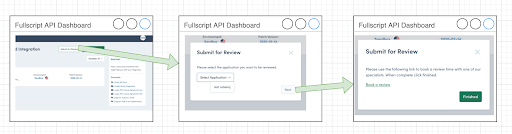
Our team may follow up with feedback or questions. Restricted endpoint access is evaluated as part of this review when your integration depends on those capabilities.
3. Create production applications
After approval, you can create production applications on the API Dashboard. Follow the go-live checklist for your integration path:
Update your production code to use production base URLs, OAuth credentials, and webhook secrets.
4. Verify restricted endpoints in production
Before launch, confirm that the restricted endpoints your integration depends on respond successfully against production hosts. If you encounter permission errors, contact the integrations team — you may need additional endpoint approval beyond general production access.
Who to contact
| Situation | Contact |
|---|---|
| Requested production access | integrations@fullscript.com |
| General API questions | api@fullscript.com |
| Bugs and technical support | Submit a ticket through your dev portal |
When emailing about restricted endpoints, include:
- Your company name and API Dashboard account
- The sandbox application name under review
- Which restricted endpoints you need in production
- A short description of your use case and target go-live timeline
Frequently asked questions
Do I need approval before I start building?
No. Start building in sandbox immediately after you receive sandbox account access. Request production access when your integration is ready for review.
Is production account access the same as restricted endpoint approval?
Production account access lets you create production applications and call the production API. Restricted endpoints are evaluated during your integration review. In most cases, both are handled in a single review conversation — but you should confirm which restricted endpoints you need when you submit for review.